Senior Product & UX/UI Designer · GoStudent
GoStudent Lesson Booking Flow
A CRO-driven redesign of the multi-step lesson booking funnel. I led the design of a gamified, bite-size flow that increased Visit to Lead conversion and gave marketing teams a flexible, campaign-ready solution.
What came out of it
Visit to Lead ↑
Improved conversion by replacing long forms with a gamified, multi-step flow. Users saw progress and stayed motivated to complete.
Unified flow
One component-based solution for HP, landing pages, and paid campaigns. Marketing could tailor flows per campaign without engineering rework.
5-step funnel
Subject → level → tutor match → date/time → contact details. Each step felt achievable, reducing perceived effort and abandonment.
The challenge
GoStudent's lesson booking flow was a primary conversion entry point across paid and owned channels, but long forms and fragmented landing experiences were suppressing Visit to Lead performance. GDN submissions were especially affected by incomplete or inaccurate contact data.
I led a CRO-focused redesign to improve completion, lead quality, and campaign reuse. The objective was to make the journey feel lightweight for parents while remaining robust enough for high-volume marketing experimentation.
What we set out to achieve
- Increase Visit to Lead CVR by replacing long forms with a gamified, step-by-step experience
- Provide a seamless, bite-size booking flow that keeps users engaged and motivated to finish
- Validate whether a gamified approach would improve completion rates and lead quality
- Update the multi-step booking with GoStudent's refreshed branding
- Deliver a unified, component-based solution for CRO and Marketing to use across HP, LPs, and paid campaigns
- Set user expectations early so they understand the journey and feel motivated to complete all stages
How we approached it
I aligned Product, CRO, Marketing, Sales, Tutor Teams, and the Acquire Product Group around a shared conversion framework. We combined prior test learnings with user research, then translated those insights into a component-based architecture that could be reused across homepage, landing pages, and paid campaigns.
CRO-first design
Every step optimised for conversion: clear progress, one question at a time, gamified elements to reduce perceived effort and keep users moving forward.
Cross-functional alignment
Stakeholder workshops, CRO data review, and engineering sync to ensure the flow worked for marketing campaigns, sales, and product.
Component-based UI
Reusable, branded components so marketing could tailor flows per campaign without engineering rework. One source of truth for multi-step forms.
User research: talking to parents
Before locking in the flow, we spoke with parents who had either completed or abandoned the booking process. Their feedback shaped one of the biggest design decisions: when and how to show tutors.
Parents told us they wanted to see who they were booking with before committing to a time slot. “I'd like to know who my child will be learning from” and “Can I browse tutors before I pick a date?” were recurring themes. Trust mattered. They wanted to read about the tutor's experience, teaching style, and qualifications before handing over their contact details.
Key research insight
Parents wanted an option to see tutors before booking. They preferred to browse profiles, compare options, and make an informed choice rather than booking a slot blindly and hoping for a good match.
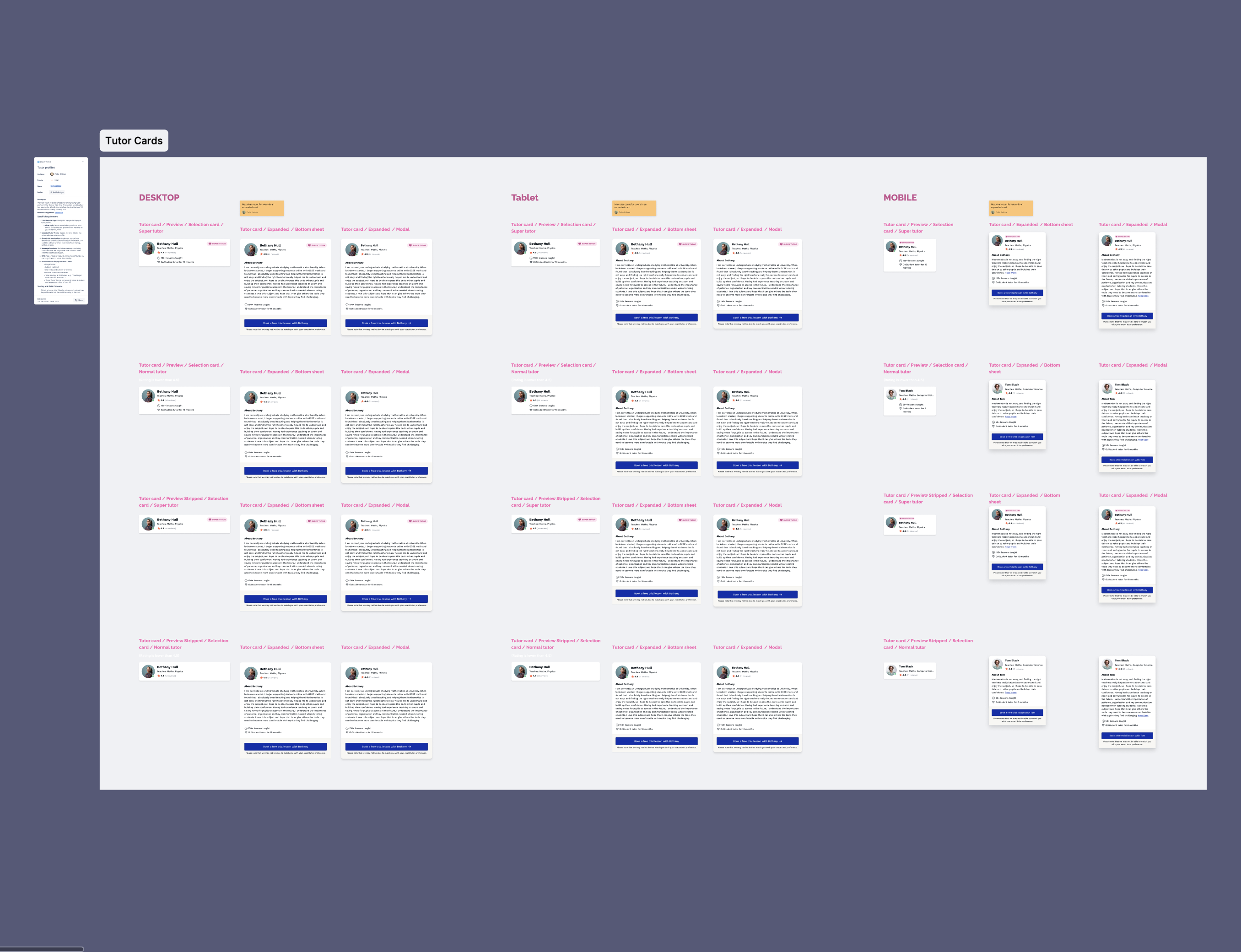
We explored two flow variants to test this: Show tutors first (browse tutors, then pick date/time) vs Show date & time first (pick availability, then see tutors for that slot). The “Show tutors first” variant directly addressed the research feedback and became our primary approach for users who valued choice and transparency.
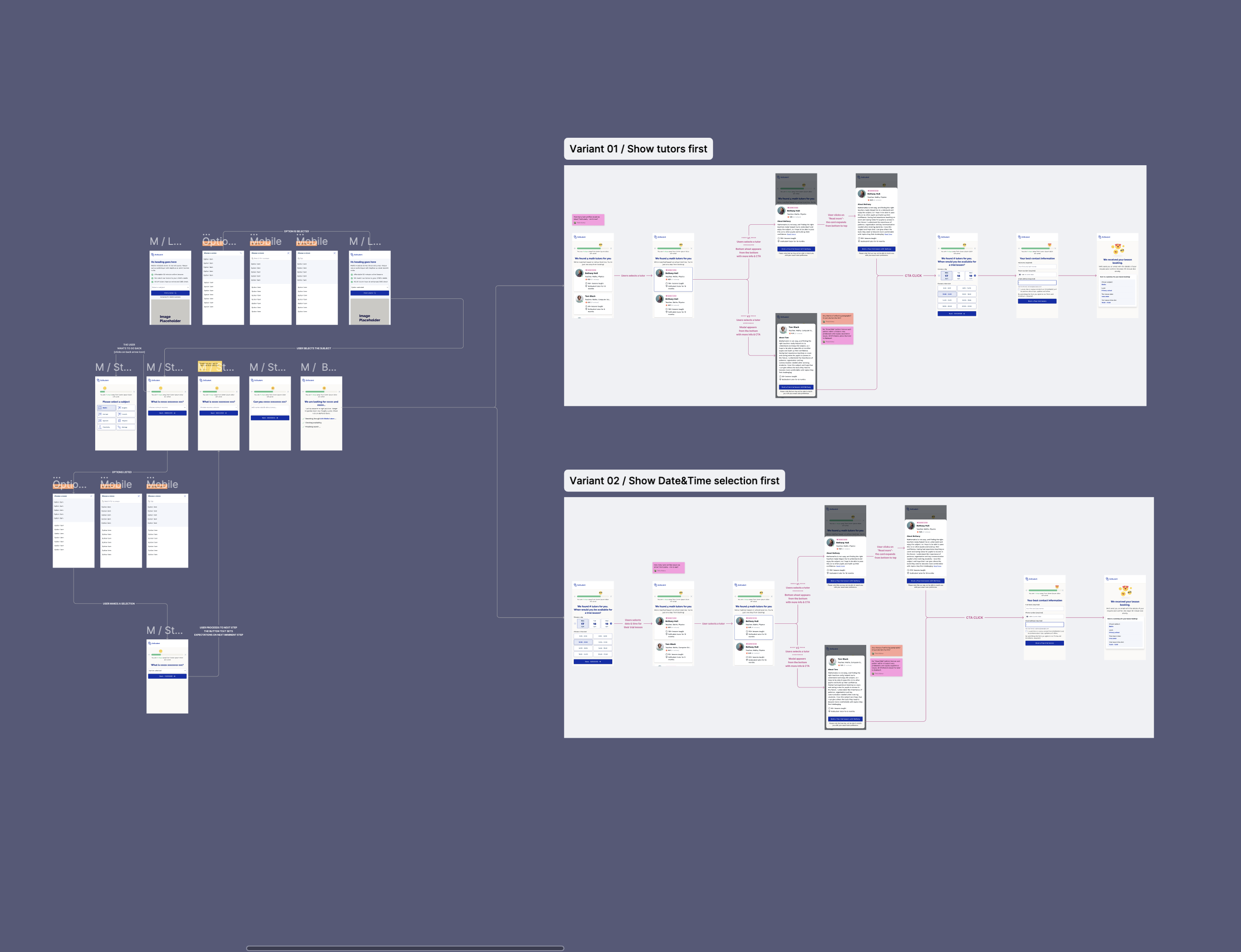
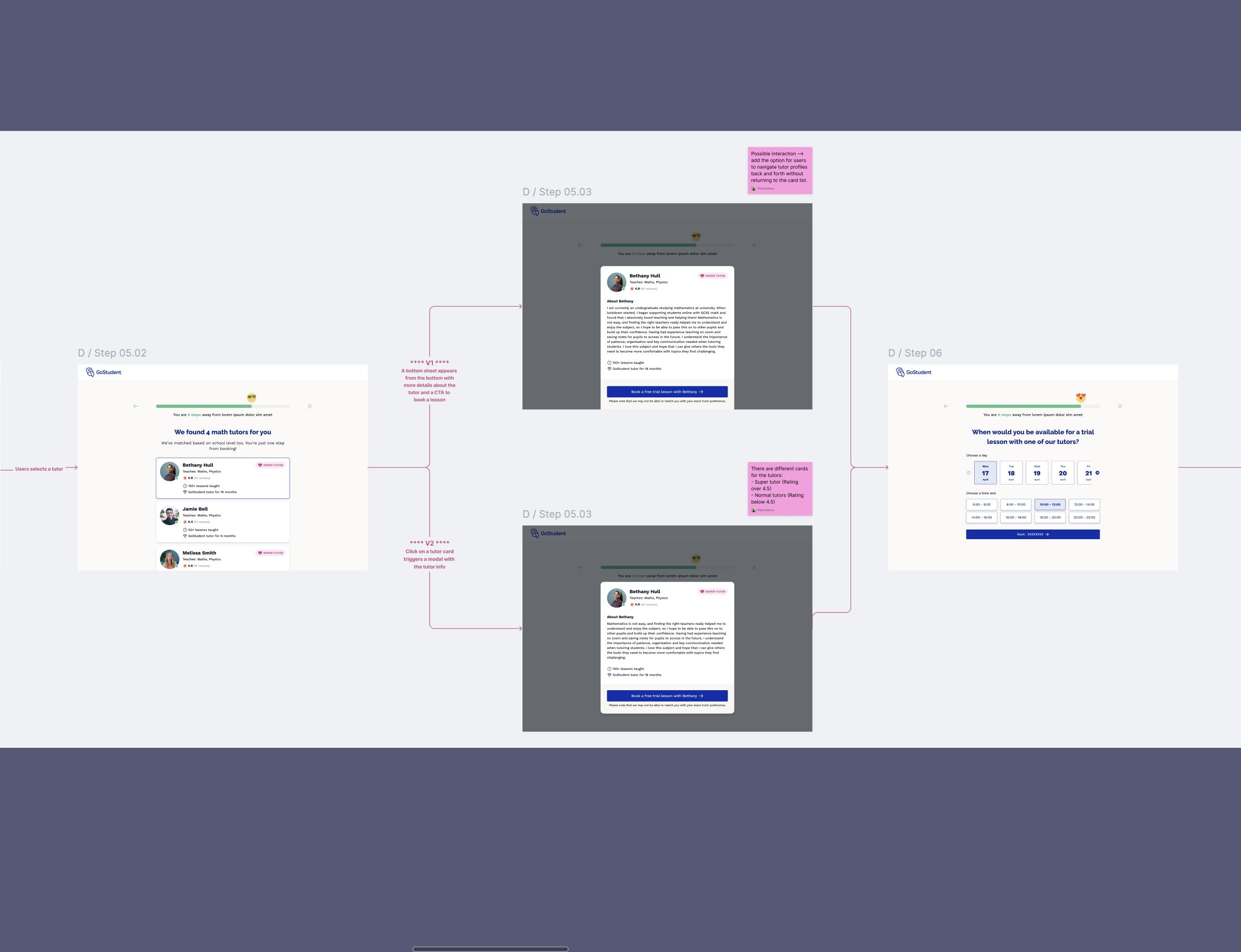
To support this, we designed tutor cards with preview and expanded states that worked across desktop, tablet, and mobile. Preview cards showed name, rating, subjects, and rate; expanded modals or bottom sheets revealed full bios, qualifications, and lesson counts. We also distinguished Super Tutors (rating 4.8+) from standard tutors so parents could quickly spot top performers.
The flow: bite-size steps
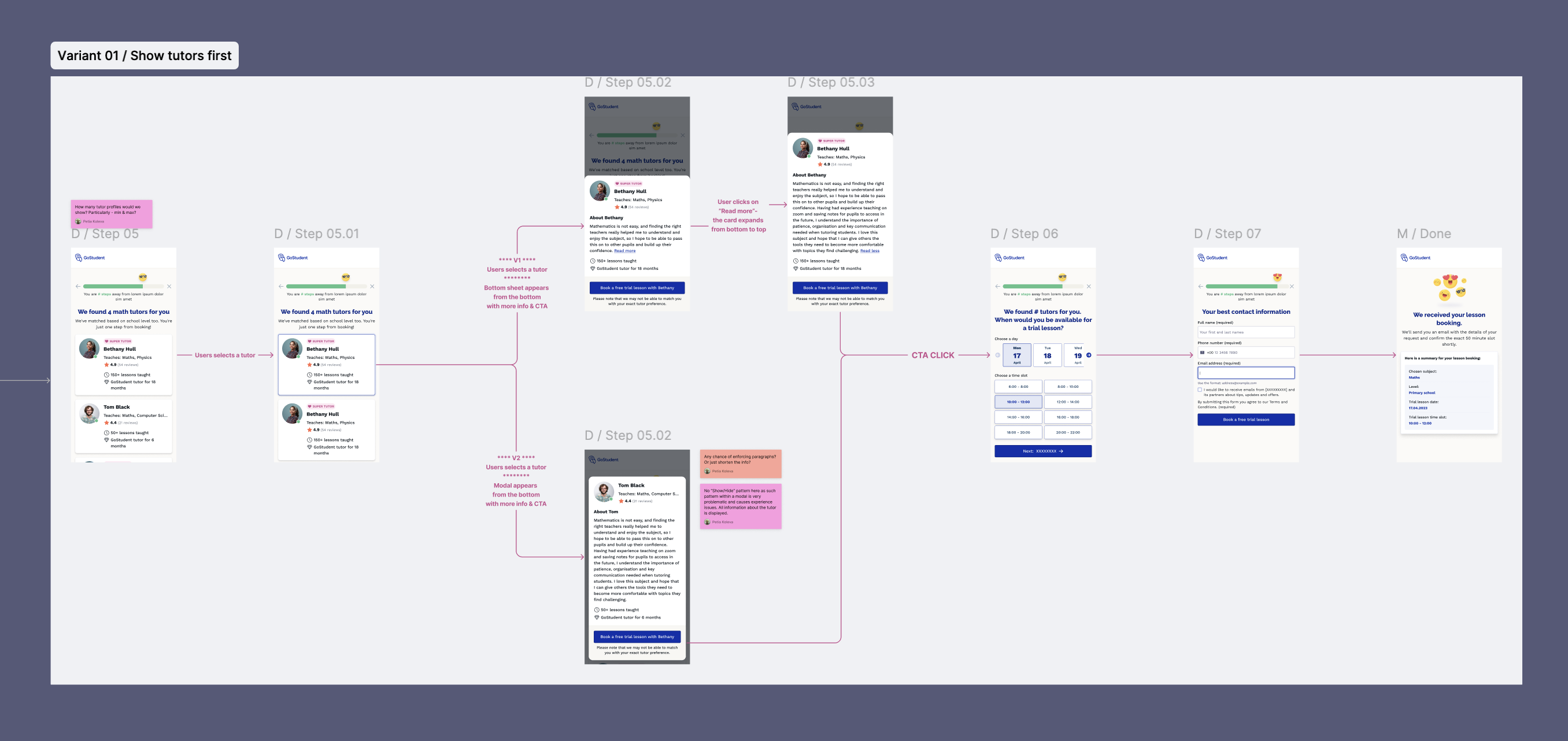
The flow was structured as five clear steps: subject → level → tutor match → date/time → contact details. Each step had a single focus, a visible progress indicator, and gamified elements (e.g. friendly emojis, “5 steps to find the right tutor”) to keep users motivated. The aim was to make the journey feel achievable, not overwhelming.
Step 1: Subject selection
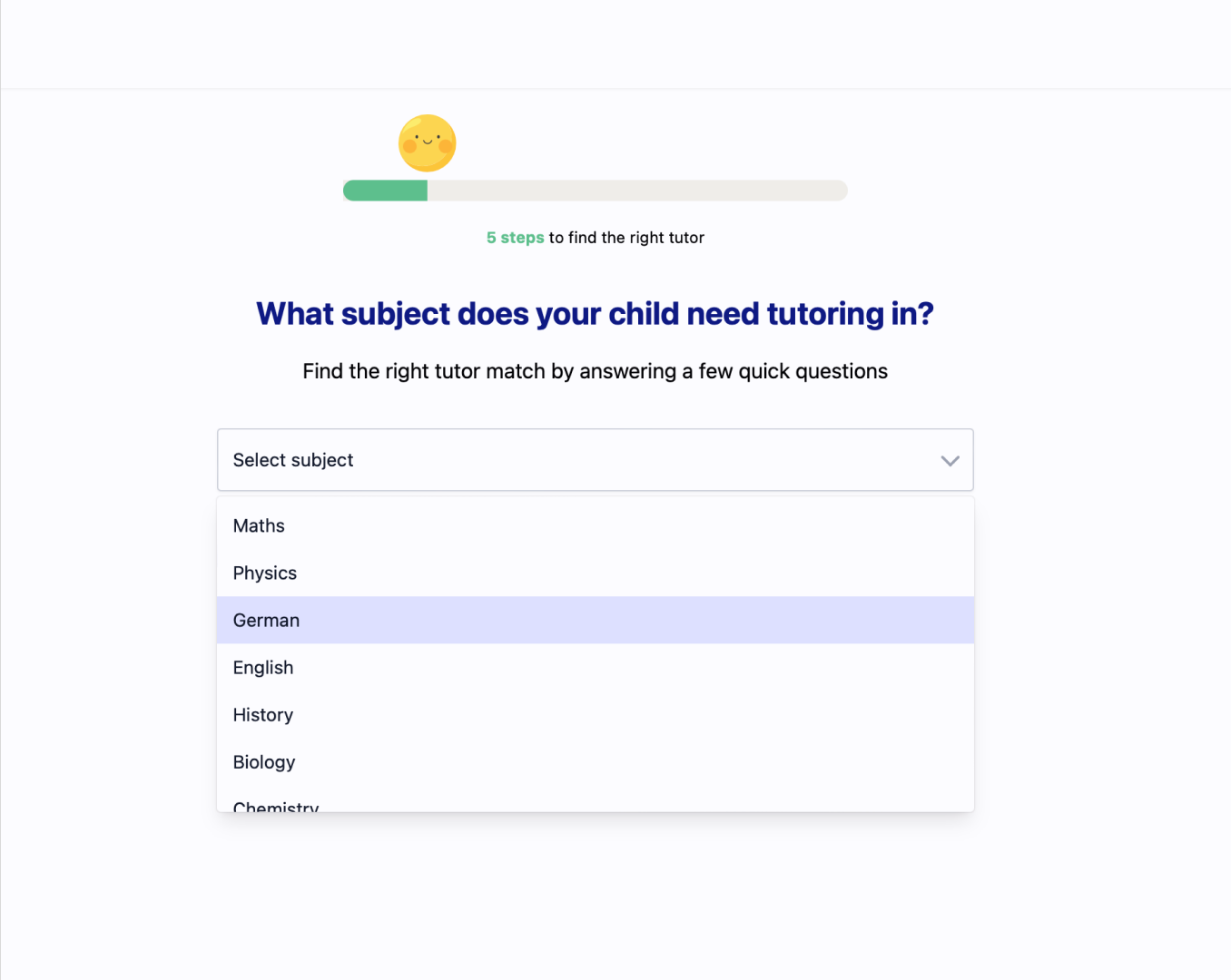
Users start by choosing the subject their child needs tutoring in. A dropdown keeps the interaction simple and error-free. The progress bar and “5 steps” copy set expectations from the start.
Component states and consistency
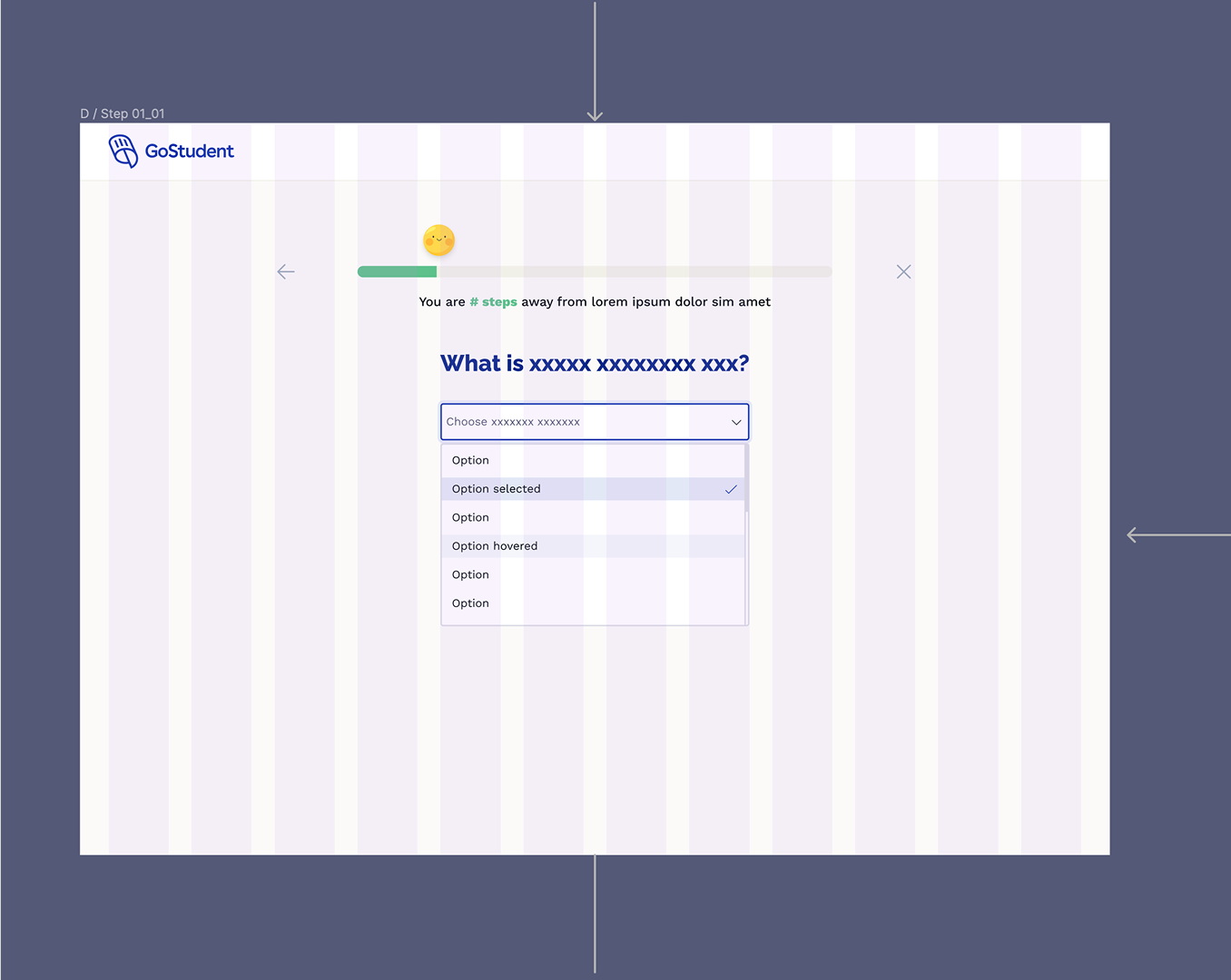
Each step used the same component patterns: clear question, single input, back/close controls, and progress feedback. Dropdowns had documented default, selected, and hover states so the flow felt consistent across all touchpoints.
Tutor selection and profile view
Informed by parent feedback, we surfaced tutors before asking for a date. Users see matched tutors (filtered by subject and rating), then tap a card to open a modal or bottom sheet with full bio, experience, and a clear “Book a free trial lesson” CTA. We also explored a carousel to browse between tutor profiles without closing the modal.
Date and time selection
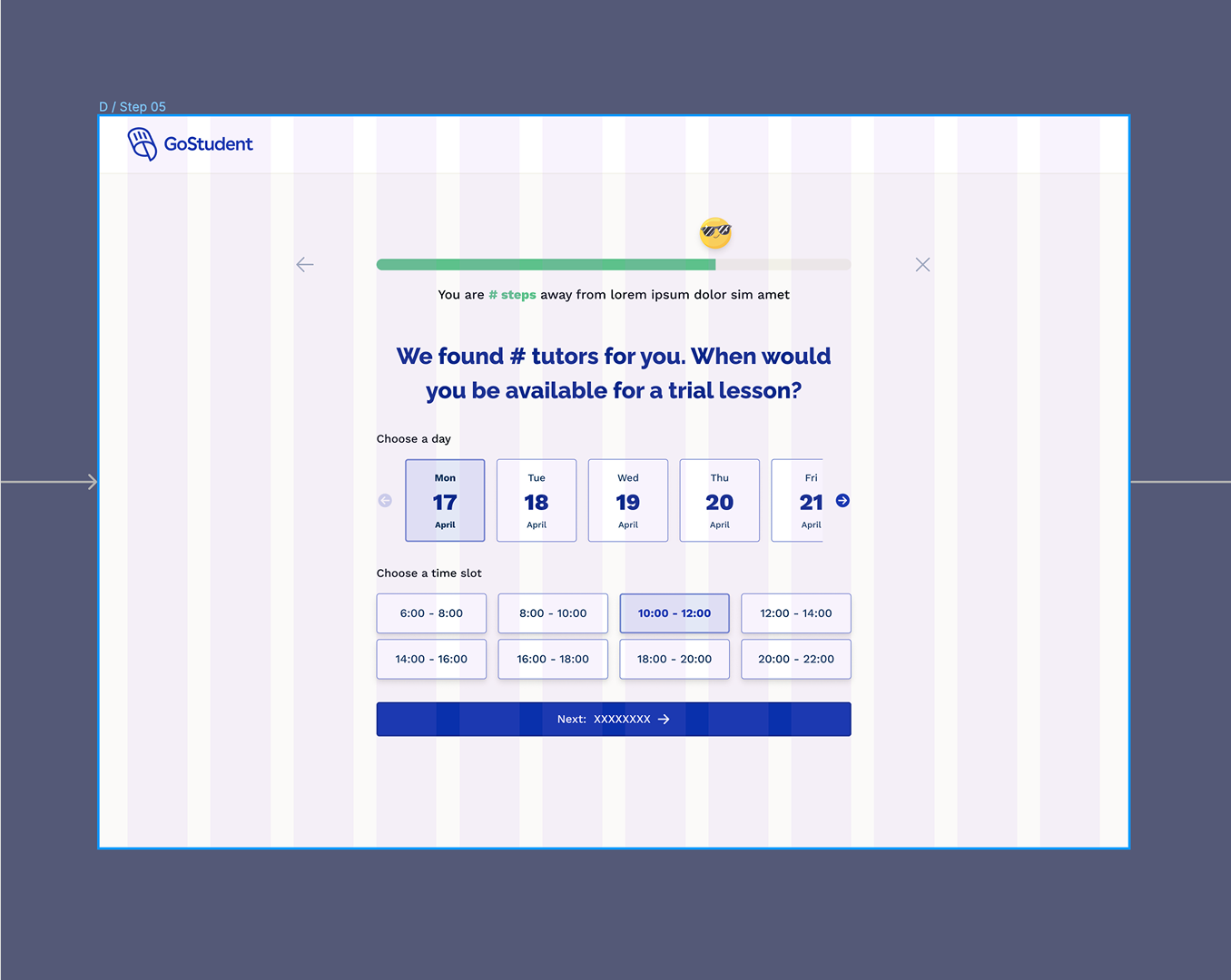
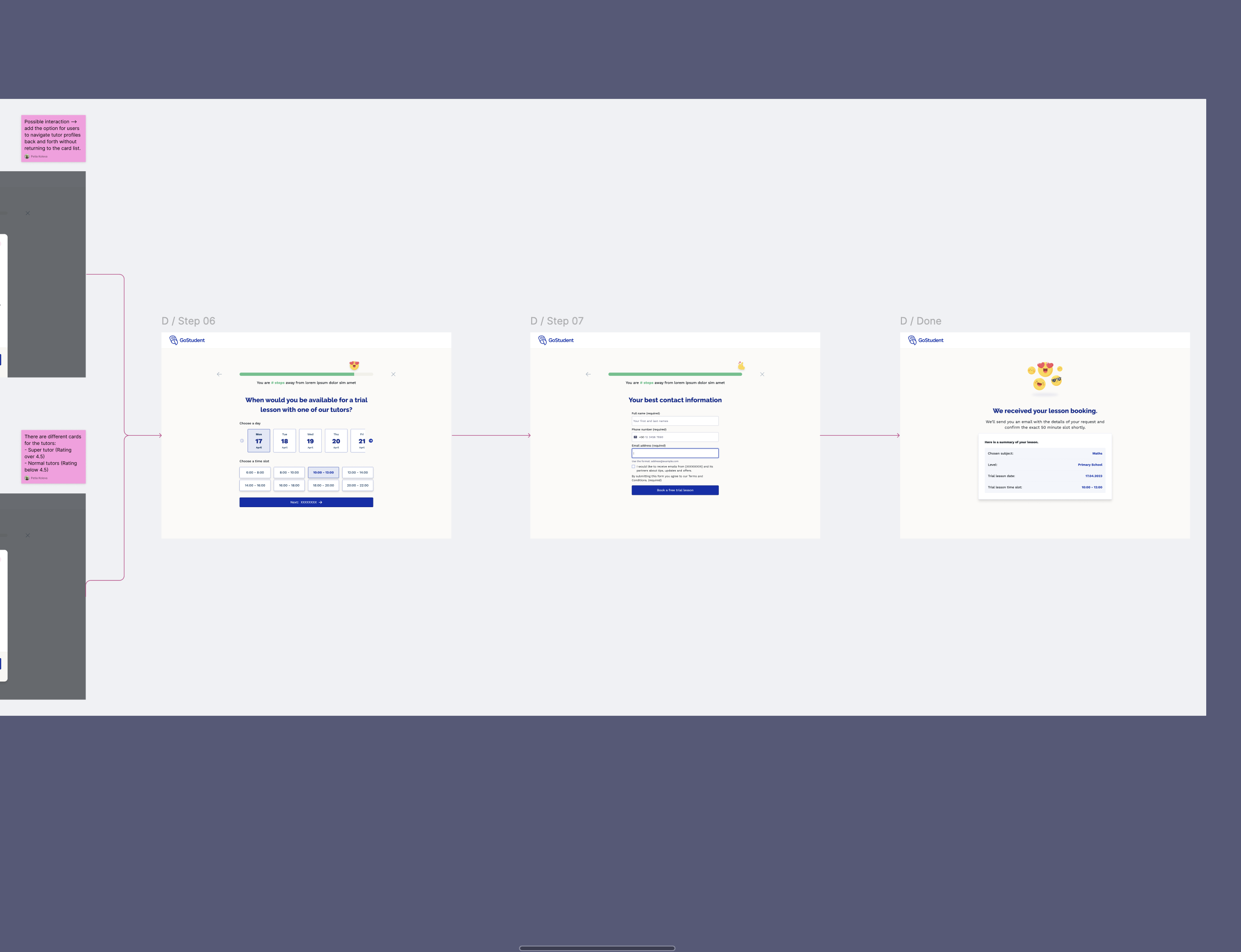
After tutor matching, users choose a day and time slot. The headline “We found # tutors for you” reinforces value before asking for commitment. Day cards and time slot buttons make selection fast and clear, with visual feedback for the chosen options.
Contact details and confirmation
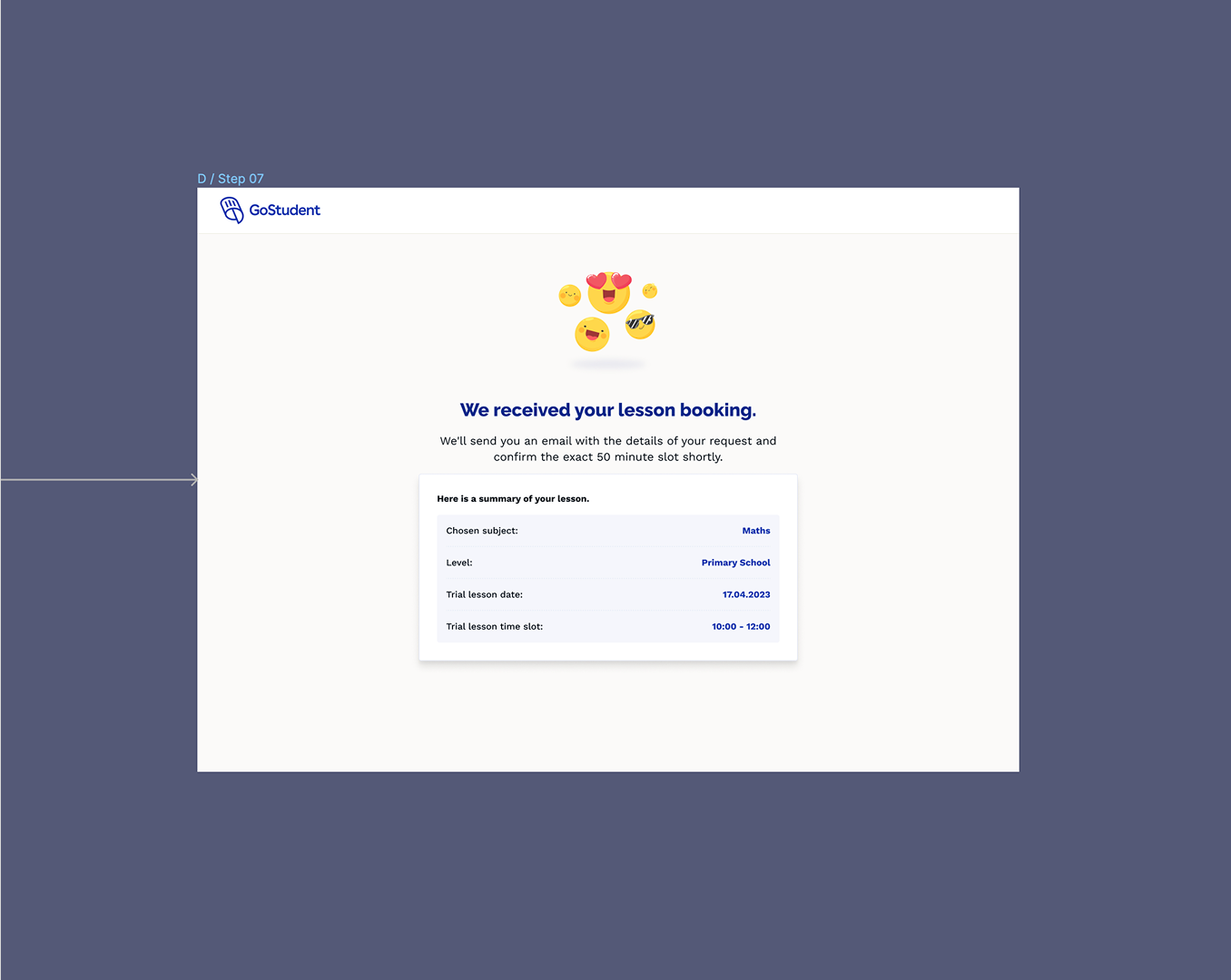
After selecting date and time, users provide contact information. The final step confirms the booking with a clear summary: subject, level, date, time, and tutor. Positive reinforcement (emojis, “We received your lesson booking”) reduces post-submit anxiety and sets expectations for the follow-up email.
Alternative variant: date & time first
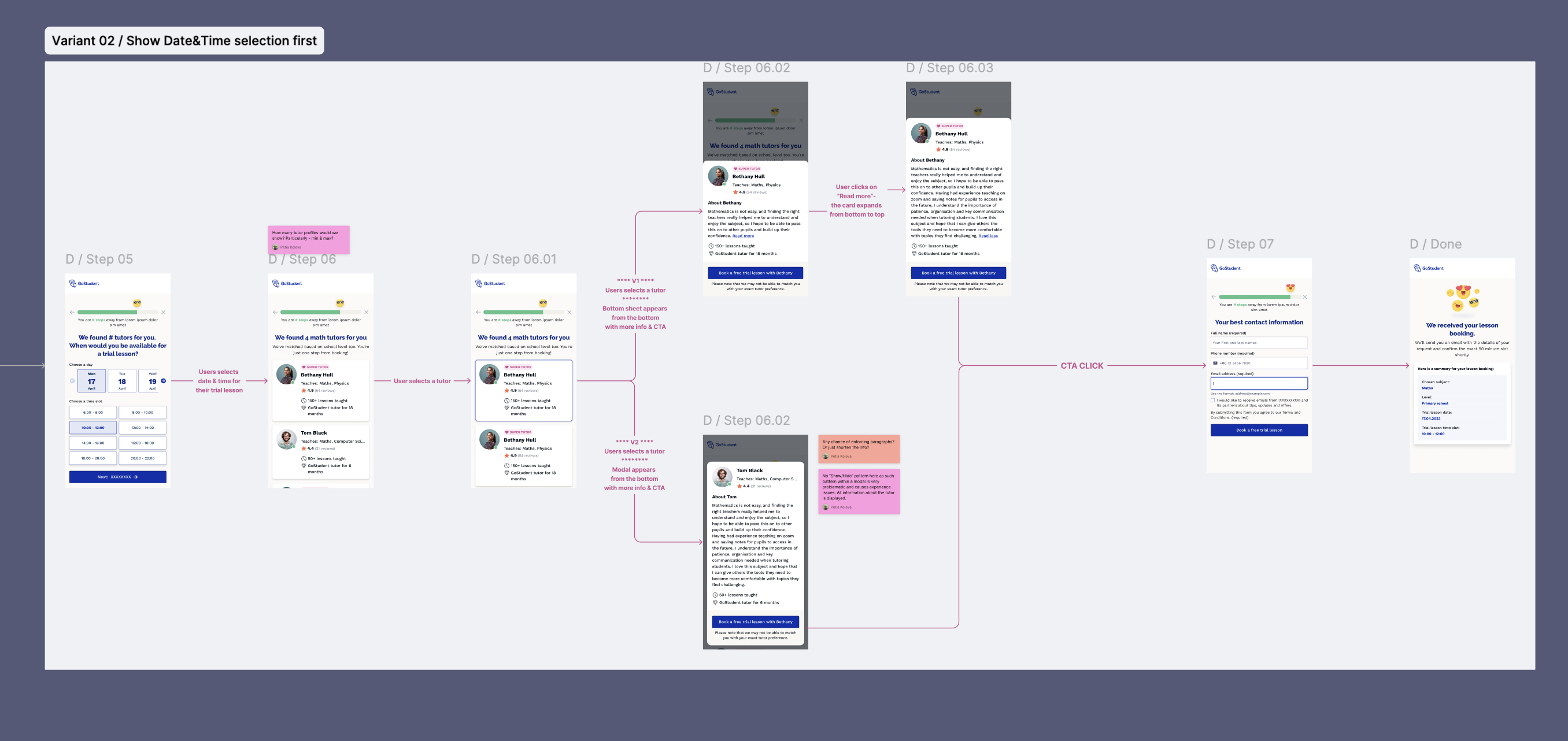
We also designed Variant 02, where users pick date and time first, then see tutors available for that slot. This suited users who prioritised convenience over choice. Both variants included detailed tutor profiles so parents could still review who they were booking with before submitting.
CRO outcomes
The redesigned flow addressed the main conversion blockers: cognitive overload from long forms, unclear progress, and low-quality landing pages. By breaking the journey into five focused steps with gamified elements and clear progress indicators, we reduced perceived effort and gave users a reason to complete each stage.
- Visit to Lead CVR: Improved versus the previous long-form baseline through a clearer step-based journey.
- Completion rates: Better progression and lower abandonment through clearer expectation-setting and reduced cognitive load.
- Campaign flexibility: Marketing could tailor the flow per campaign (HP, LPs, paid ads) using the same component set.
- Engineering efficiency: One unified component-based solution instead of ad-hoc forms per touchpoint.
What I led and delivered
- Led end-to-end redesign of a high-impact booking journey with CRO and delivery constraints in view.
- Translated behavioural insight and parent research into concrete flow decisions, including tutor-first trust cues.
- Built reusable flow architecture that improved campaign flexibility without repeated custom implementation.
- Aligned Marketing, CRO, Sales, and Engineering around one scalable conversion framework.
- Established a stronger baseline for ongoing experimentation and optimisation by channel.